SEMrush is a powerful SEO tool that lets you research competitors, track keyword rankings, and analyze website traffic. But the web crawler that powers it, known as SemrushBot, can also be a problem for website owners. If SemrushBot is crawling your site aggressively, it can eat up server resources, increase bandwidth usage, and slow down page load times.
This guide covers multiple methods for blocking SemrushBot, from robots.txt configuration to server level blocking with .htaccess and firewall rules. We also cover the challenges you may run into and how to handle them.

Table of Contents
What Is the SEMrush Bot?
SemrushBot is a web crawler (also called a web spider or web robot) that systematically follows hyperlinks across the internet, collecting data as it goes. It feeds information into SEMrush’s suite of tools, including backlink analysis, competitive analysis, keyword research, and site audits.
Unlike search engine bots from Google or Bing, SemrushBot is not indexing your site for search results. It is gathering data that SEMrush users can access through their platform. That means blocking it will not affect your search engine rankings.
SemrushBot identifies itself through its user agent string in HTTP requests. There are also several specialized crawlers tied to specific SEMrush tools, each with its own user agent. These include SiteAuditBot, SemrushBot-BA (Backlink Audit), SemrushBot-SI (On Page SEO Checker), SemrushBot-SWA, SemrushBot-BM (Brand Monitoring), SemrushBot-CT (Content Analyzer), SemrushBot-COUB (Content Outline Builder), and SplitSignalBot.
Why Block SemrushBot?
Not every website owner needs to block SemrushBot. But there are common situations where it makes sense:
- Server load and bandwidth. SemrushBot can generate a high volume of requests, especially on larger sites. If you are on shared hosting or a resource-constrained server, this can degrade performance for real visitors.
- Privacy and data collection. Some site owners simply do not want third-party tools scraping their content, backlink profiles, or site structure.
- Unwanted crawl activity. If SemrushBot is crawling areas of your site that serve no purpose for SEO tools (staging environments, internal directories, etc.), blocking it removes unnecessary traffic.
- Cost. On metered hosting or CDN plans, bot traffic adds up. Blocking crawlers you do not benefit from reduces costs.
If SemrushBot traffic is minimal and not causing issues, there is no need to block it. But if it is consuming resources or you want tighter control over who crawls your site, the methods below will help.
Method 1: Block SemrushBot Using Robots.txt
The robots.txt file is the standard way to tell web crawlers which parts of your site they should or should not access. It sits in the root directory of your domain and is the first thing well-behaved bots check before crawling.
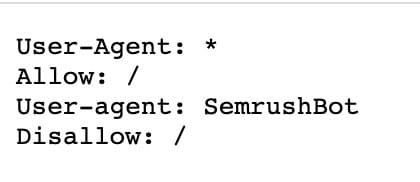
Block All SemrushBot Crawling
Add this to your robots.txt file:
User-agent: SemrushBot Disallow: /
This tells SemrushBot it is not allowed to crawl any page on your site.
Slow Down SemrushBot Instead of Blocking It
If you do not want to block SemrushBot entirely, you can use a crawl-delay directive to limit how fast it crawls:
User-agent: SemrushBot Crawl-delay: 60
This tells the bot to wait 60 seconds between requests, which significantly reduces its impact on server load.
Block Specific SEMrush Crawlers
You can also target individual SEMrush tools by blocking their specific user agents:
Site Audit Bot:
User-agent: SiteAuditBot Disallow: /
Backlink Audit:
User-agent: SemrushBot-BA Disallow: /
On Page SEO Checker:
User-agent: SemrushBot-SI Disallow: /
SWA Tool:
User-agent: SemrushBot-SWA Disallow: /
Content Analyzer and Post Tracking:
User-agent: SemrushBot-CT Disallow: /
Brand Monitoring:
User-agent: SemrushBot-BM Disallow: /
SplitSignal:
User-agent: SplitSignalBot Disallow: /
Content Outline Builder:
User-agent: SemrushBot-COUB Disallow: /
This selective blocking strategy lets you keep certain SEMrush tools active (for example, allowing backlink analysis data collection) while blocking others that generate more aggressive crawl activity like site audits.
How to Find and Edit Your Robots.txt File
Your robots.txt file is located in the root directory of your website. You can verify it by visiting yourdomain.com/robots.txt in your browser.
To edit it, you can use an FTP client like CyberDuck or FileZilla to access the file directly on your server. If you are running WordPress, the Yoast SEO plugin provides a built-in file editor under Yoast SEO > Tools > File Editor > robots.txt.
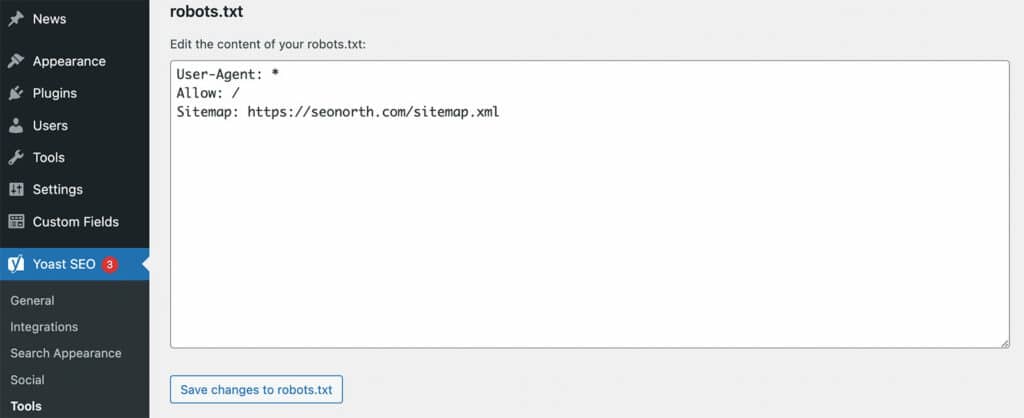
If you do not have a robots.txt file, you can create one using a text editor and upload it to your site’s root directory.
Important: If you have subdomains, you must place a separate robots.txt file on each subdomain. A robots.txt file on yourdomain.com will not apply to blog.yourdomain.com or shop.yourdomain.com. Each subdomain needs its own file in its own root directory for full coverage.
How Long Does It Take for Robots.txt Changes to Work?
SemrushBot does not re-read your robots.txt file on every single request. Instead, it caches the file and re-checks periodically. According to SEMrush, it can take up to one hour or 100 requests for SemrushBot to discover and process changes to your robots.txt file.
This means you should not expect instant results after updating the file. Give it at least a day before checking whether crawl activity has dropped. If you need immediate blocking, the server level methods below are more effective.
Method 2: Block SemrushBot Using .htaccess (Apache Server)
If robots.txt is not getting the job done, or you want a harder block that does not rely on bot compliance, you can block SemrushBot at the server level using your .htaccess file. This works on Apache servers and returns a 403 Forbidden status code to any request from SemrushBot.
Add this to your .htaccess file:
RewriteEngine On RewriteCond %{HTTP_USER_AGENT} SemrushBot [NC] RewriteRule .* - [F,L]
This checks the user agent of every incoming request. If it matches “SemrushBot,” the server blocks the request before it ever reaches your site. The [NC] flag makes the match case-insensitive, and [F,L] returns a 403 forbidden status and stops processing further rules.
You can also block multiple SEMrush user agents in a single rule:
RewriteEngine On RewriteCond %{HTTP_USER_AGENT} (SemrushBot|SiteAuditBot|SplitSignalBot) [NC] RewriteRule .* - [F,L]
The .htaccess method is stronger than robots.txt because it does not depend on the bot choosing to obey the directive. The server simply refuses the connection.
Note: The .htaccess file is located in the root directory of your website on Apache servers. If you are using Nginx, you would add a similar block in your server configuration using an if directive to check the user agent. If your site sits behind a load balancer, make sure the user agent header is being passed through to the origin server, or the block may not work as expected.
Method 3: Block SemrushBot Using a Firewall or CDN
For the most reliable blocking, you can use firewall rules at the network level. This stops SemrushBot before requests even reach your web server, reducing server load to zero from those requests.
Cloudflare WAF
If your site uses Cloudflare, you can create a WAF (Web Application Firewall) rule to block SemrushBot:
- Log in to your Cloudflare dashboard.
- Go to Security > WAF > Custom Rules.
- Create a new rule with these settings:
- Field: User Agent
- Operator: Contains
- Value: SemrushBot
- Action: Block
This blocks any request where the user agent string contains “SemrushBot” and returns a Cloudflare block page. You can add multiple user agent values to catch all the SEMrush crawler variants.
Other Firewalls and CDN Providers
Most CDN and firewall providers (Sucuri, AWS WAF, Akamai, etc.) offer similar user agent blocking rules. The setup varies by provider, but the logic is the same: match the user agent string and block the request.
Firewall-level blocking is the most effective method because it works regardless of whether the bot respects robots.txt. It also protects against bots that impersonate SemrushBot’s user agent string, since the block applies to anything matching the pattern.
A note on IP address blocking: SEMrush operates its crawlers from a large, distributed pool of IP addresses that changes regularly. Blocking by IP address is not an effective strategy for stopping SemrushBot, as the addresses rotate frequently. User agent-based blocking is the recommended approach.

Challenges in Blocking SemrushBot
Even with the right configuration in place, you may run into a few issues when trying to block SemrushBot.
Robots.txt is not enforceable. The robots.txt standard is a voluntary protocol. Well-known crawlers like SemrushBot generally respect it, but there is no technical mechanism that forces compliance. Some users have reported that SemrushBot continues to crawl despite robots.txt directives, though this can sometimes be attributed to caching delays or bots impersonating SemrushBot’s user agent.
Impersonating bots. A bot that sends requests with SemrushBot in the user agent string is not necessarily the real SemrushBot. Rogue bots or scrapers sometimes impersonate well-known crawlers. These imposters will not obey robots.txt at all. Server level blocking with .htaccess or a firewall catches both legitimate and impersonating bots.
Caching delays. As noted above, SemrushBot caches your robots.txt and may continue crawling for up to an hour or 100 requests after you make changes. This is normal behavior and not a sign that the block is failing.
Load balancer and proxy configurations. If your site uses a load balancer or reverse proxy (common with CDN setups), the user agent header may not always be forwarded to the origin server. This can cause .htaccess rules to fail silently. Make sure your infrastructure passes the user agent header through to where your blocking rules are applied.
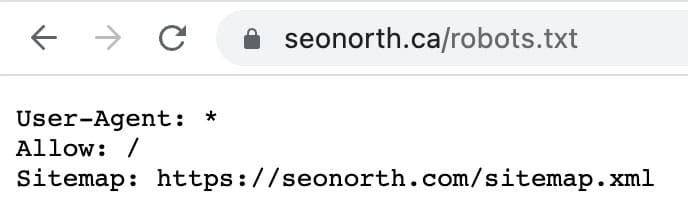
Testing Your SemrushBot Block
After implementing any of the methods above, verify that the block is working:
- Visit yourdomain.com/robots.txt to confirm the directives are in place.
- Check your server access logs for requests from SemrushBot user agents. If you are using .htaccess or firewall rules, you should see 403 responses instead of 200s.
- If you use Cloudflare, check your Firewall Events log for blocked requests matching the SemrushBot user agent.
- Give it at least 24 hours before drawing conclusions, since the SemrushBot cache can delay compliance with robots.txt changes.
FAQs
Why does SemrushBot crawl your website?
What does SemrushBot do with the data it collects?
What bot does SEMrush use to crawl?
Published on: 2022-08-20
Updated on: 2026-04-02
