In today’s digital marketplace, Google Business Profiles have become essential for consumers looking to find local services, yet this popularity has also attracted scammers. Learning to identify fraudulent listings can protect you from scams and help support legitimate businesses in your community

Google Business Profiles (formerly Google My Business) are critical for legitimate businesses looking to enhance their online presence through local SEO. Unfortunately, scammers frequently create fake business listings to deceive potential customers, harming the reputation of genuine local businesses. Knowing how to spot these fraudulent profiles can protect you and your community.
Signs of a Fake Google Business Profile
- Suspicious Business Name and Details – Fake business profiles often use vague, generic, or keyword-stuffed business names, such as “Best Plumber Near Me” or “Top SEO Services.” Legitimate businesses typically have unique, professional names.
- Unverifiable or Incorrect Address – A significant red flag is an address that doesn’t exist or leads to a different business or residential location. Always verify through Google Maps or a quick Google search to confirm authenticity.
- Lack of Genuine Reviews – Profiles with exclusively five-star reviews or numerous fake reviews without substantial feedback can indicate fraudulent activity. Watch out for profiles with positive reviews from accounts that have reviewed businesses in multiple unrelated geographical areas.
- Excessive negative reviews – Targeting Competitors Scammers often leave fake negative reviews for legitimate businesses to damage their online reputation. Genuine reviews typically discuss specific details rather than vague criticisms.
- Suspicious Phone Numbers and Contact Information – Fake profiles may list incorrect or unreachable phone numbers. Legitimate businesses typically maintain consistent, verifiable contact information across their online presence, including their website and social media.
- Missing or Minimal Online Presence – Real businesses usually have a robust online presence, including social media profiles, websites, and consistent information across different platforms like Amazon or industry-specific directories. A lack of online presence beyond the Google Business Profile can indicate a scam.
How to Spot Fake Reviews on a Google Business Profile
Fake reviews are one of the strongest signals that a business profile is fraudulent. When evaluating reviews, look for these red flags:
- Clustered posting dates. Multiple five-star reviews posted within days or hours of each other often indicate purchased or coordinated reviews.
- Vague, generic language. Reviews that say things like “great service, highly recommend!” without mentioning a specific product, service, or interaction are common in fake review campaigns.
- Overly emotional extremes. Language like “best experience of my life” or “worst company on the planet” with no supporting detail is a hallmark of fabricated feedback.
- Geographic inconsistencies. A local plumber in Ottawa with glowing reviews from accounts based in Texas, California, and Florida should raise immediate questions.
- Reviewer accounts with no profile photo or history. One-time reviewers with default avatars and no other review activity are frequently disposable accounts created for fake reviews.
- Identical phrasing across reviews. Multiple reviews using the same sentence structure or keywords suggest they were written by the same person or generated by AI.
Inspect the Reviewer’s Profile
Before trusting a review, click on the reviewer’s name or avatar to view their full Google profile. Check how many other businesses they’ve reviewed and where those businesses are located. A legitimate local reviewer will typically have a history of reviews in the same city or region. If the account has only reviewed one business, has reviewed dozens of unrelated businesses across multiple countries, or posted several reviews on the same day, treat the review with skepticism. This takes less than 30 seconds and is one of the most reliable ways to validate whether reviews on a business profile are genuine.
How to Verify the Legitimacy of a Google Business Profile using Google Maps
Step 1: Locate the Business Information
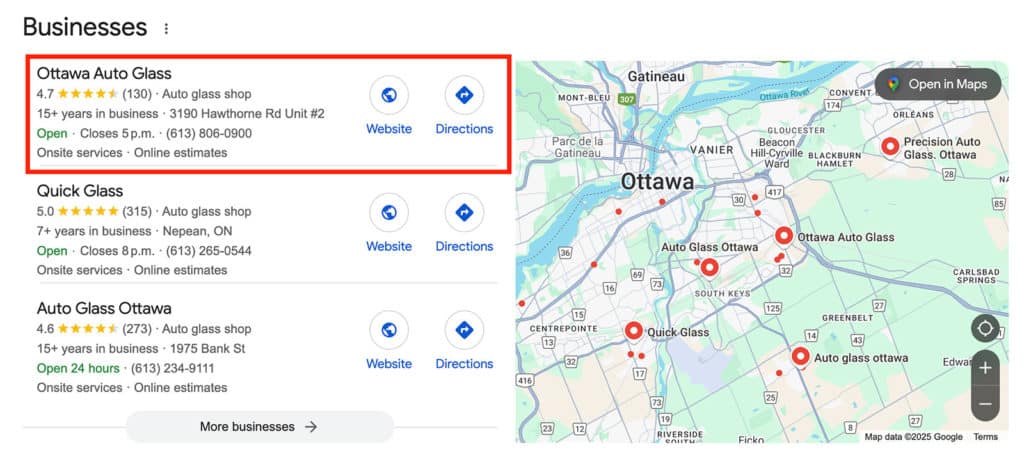
Identify the Google Business Profile you want to verify and copy the listed physical address.
e.g., Ottawa Auto Glass
Step 2: Cross-Reference via Google Maps
Open Google Maps and paste the copied address into the search bar. Once the location loads, switch to Street View mode by dragging the yellow person icon onto the map.
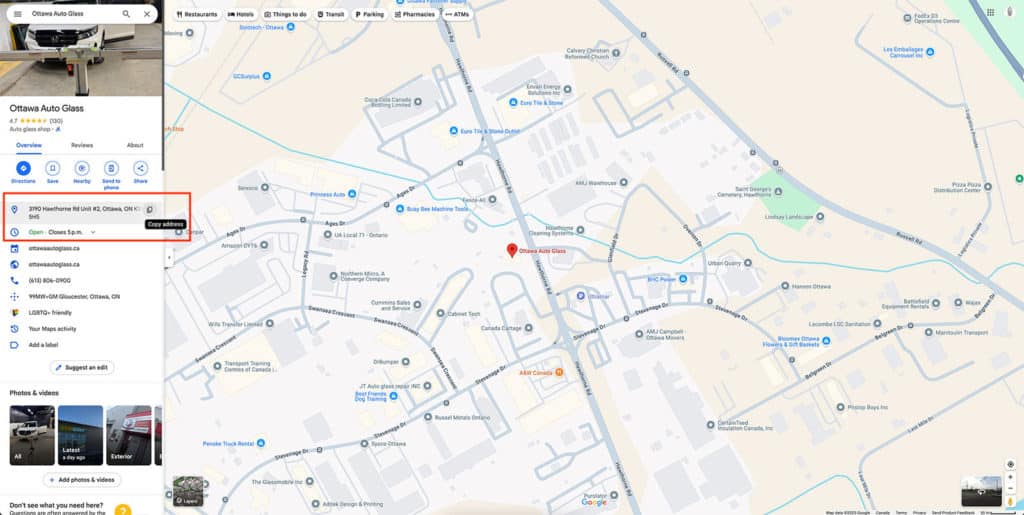
e.g., 3190 Hawthorne Rd Unit #2, Ottawa, ON K1G 5H5
Step 3: Conduct a Virtual Inspection
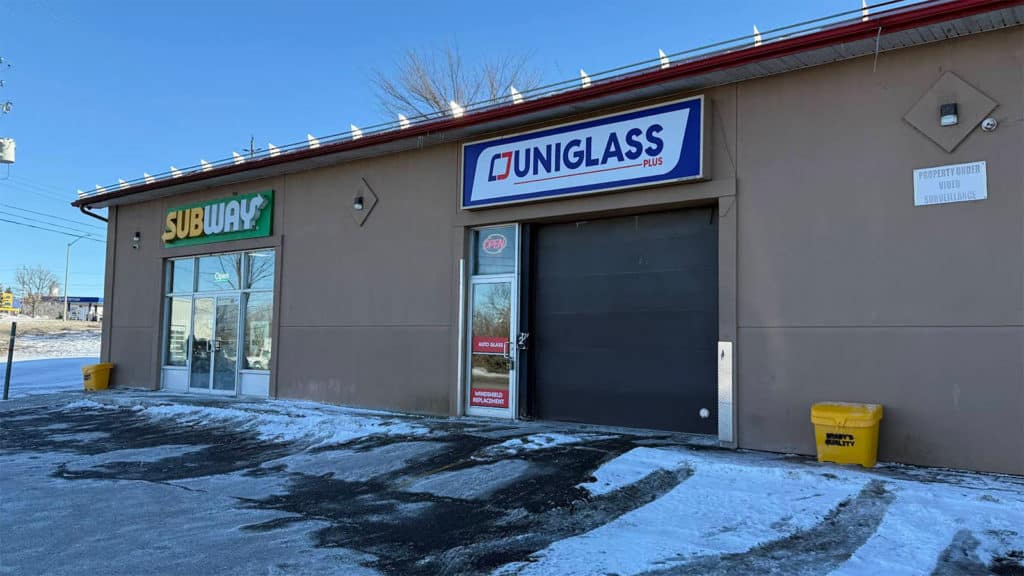
Examine the Street View imagery carefully. Look for business signage, storefronts, or other visual indicators that match the claimed business. Pay attention to whether the location appears to be a residential property, vacant lot, or another business entirely.
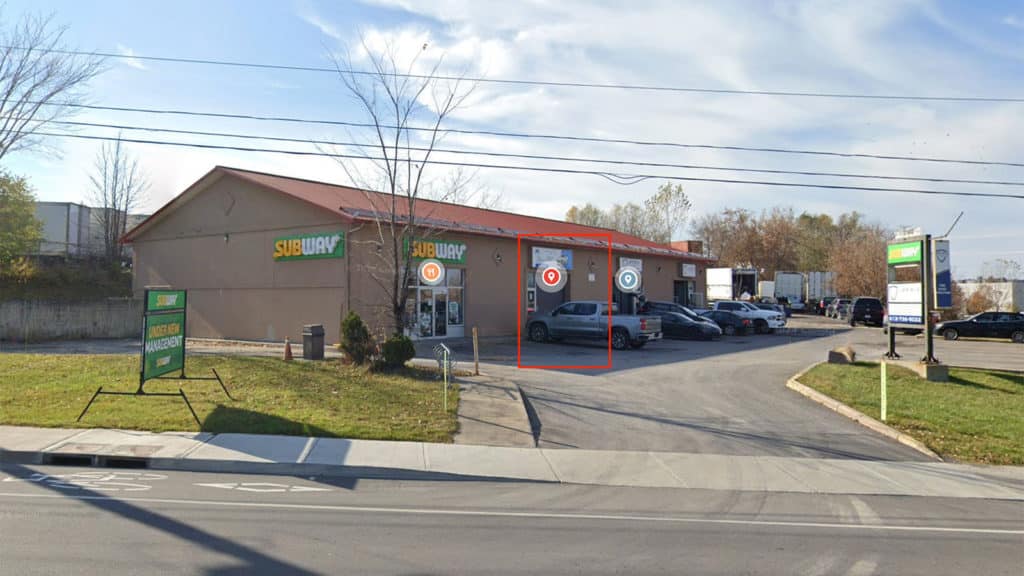
Compare it to the Business Owners Photos

Step 4: Consider an In-Person Verification (If Necessary)
For local businesses or when the stakes are high (before making significant purchases or investments), consider visiting the physical location in person to confirm the business’s existence and legitimacy.
Advanced Detection Techniques
Analyze the Business’s Online Presence
Legitimate businesses typically maintain a consistent online presence:
- Check if the business has active social media accounts that match their Google Business Profile
- Look for consistent branding across platforms
- Verify the business exists on other business listings or directories
- Search for the business owner’s name to confirm their connection to the company
- Look up the business on Google Maps
Evaluate Business Profile Completeness
Real business owners invest time in their online reputation:
- Complete “About” section with a detailed business description
- Regular posts and updates about services, promotions, or business news
- Uploaded photos that appear authentic (not stock photos)
- Responses to customer reviews (both positive and negative)
Verify Through Local SEO Signals
Legitimate local businesses usually leave digital footprints:
- The business appears in local search results for relevant queries
- Their website contains local information and service areas
- They have listings in multiple local business directories
- Local news or community websites might mention the businessCommon Types of Fake Business Profiles
Algorithm Manipulation for SEO
Some fraudulent listings aim to manipulate Google’s local search algorithm:
- Business names stuffed with keywords (e.g., “Best Plumber 24/7 Emergency Low Cost Plumbing Services”)
- Creating multiple listings for the same business with slight variations
- Using fake addresses to appear in more local search results
- Posting fake negative reviews on competitors’ profiles
How to Protect Yourself from Fake Google Business Profiles

- Cross-check information: Confirm the details provided by searching the business name, address, and phone number independently.
- Evaluate reviews critically: Pay attention to patterns in fake Google reviews or bad reviews targeting competitors.
- Report suspicious activity: If you suspect a fake listing, use Google’s Business Redressal Form or contact Google support directly to report the fraudulent profile.
Protecting Your Own Business
Business owners should:
- Claim and verify your Google Business Profile
- Regularly monitor for duplicate or fake listings of your business
- Respond professionally to all reviews, including negative ones
- Report competitors using fake listings or review manipulation
- Follow Google’s guidelines for business listings
- Consider reporting serious cases of fraud to the FTC
By being vigilant about these warning signs, consumers can avoid scammers while supporting legitimate local businesses, and business owners can protect their online reputation from fraudulent competitors.
How to Report Fake Google Business Profiles
If you identify a fake listing:
- Click on the business listing in Google Maps
- Select “Suggest an edit”
- Choose “Remove this place” and select the reason
- For more serious cases, use Google’s Business Redressal Form
- Report review spam by clicking the three dots next to individual reviews
- Document evidence with screenshots before reporting
What to Do If Google Doesn’t Remove a Fake Profile
Google doesn’t always act on reports, and the review process can take days or weeks. If your initial report is rejected or ignored, here’s how to escalate:
- Submit a one-time appeal. If Google rejects your report, you can appeal the decision through the Reviews Management Tool in your Google Business Profile dashboard. Include screenshots, evidence of address inconsistencies, and any documentation that supports your case.
- Contact Google Small Business Support. If the appeal doesn’t resolve the issue, reach out to Google’s support team directly through your Business Profile. Phone and chat support options are available for verified business owners.
- Document everything. Take screenshots of the fake profile, its reviews, listed address, and any Street View evidence before reporting. Fake profiles can be modified or removed by the scammer once they realize they’ve been flagged.
- Consider legal action for serious cases. If a fake profile is actively diverting your customers or damaging your reputation, consult with an attorney. The FTC’s 2024 rule on fake reviews may provide additional grounds for legal recourse, and some businesses have successfully pursued defamation or unfair business practice claims.
- Report to the FTC. For persistent or large-scale fraud, file a complaint at ReportFraud.ftc.gov. This won’t remove the listing directly, but it contributes to enforcement patterns that regulators use to take action against repeat offenders.
Why Spotting Fake Profiles Matters
Scammers leveraging fake business profiles on Google Search and Google Maps can significantly impact small businesses and their potential customers. Recognizing these red flags and reporting fraudulent activity helps legitimate businesses maintain credibility and ensures customers receive genuine services.
By staying vigilant and proactively managing your online interactions, you can protect yourself and support local, legitimate businesses in your community.
Fake business profiles and reviews are not just an inconvenience. They can carry legal consequences. In August 2024, the Federal Trade Commission finalized a rule that prohibits the creation, purchase, or sale of fake reviews, including reviews written by individuals who never used the product or service. Violations can result in civil penalties of up to $51,744 per offense. This regulatory shift signals that platforms like Google will face increasing pressure to crack down on fraudulent listings, and businesses caught engaging in these practices risk serious financial and legal exposure.
Published on: 2025-03-28
Updated on: 2026-09-22
