How the Connectivity Cloud Network Powers Faster, Safer, and Higher-Ranking Websites
Page speed, uptime, and security are not separate problems. They are the same problem wearing three different hats, and Google treats them that way too. A slow site loses rankings. A site that goes down during a DDoS attack loses rankings. A site flagged for insecure connections loses rankings. Cloudflare solves all three at the edge before your origin server ever sees the traffic, which is why it has become a default piece of the modern SEO stack.
This guide walks through exactly how Cloudflare affects SEO, what its AI and edge computing capabilities mean for forward-looking content strategies, and how to get started without breaking a live site.

What is Cloudflare?
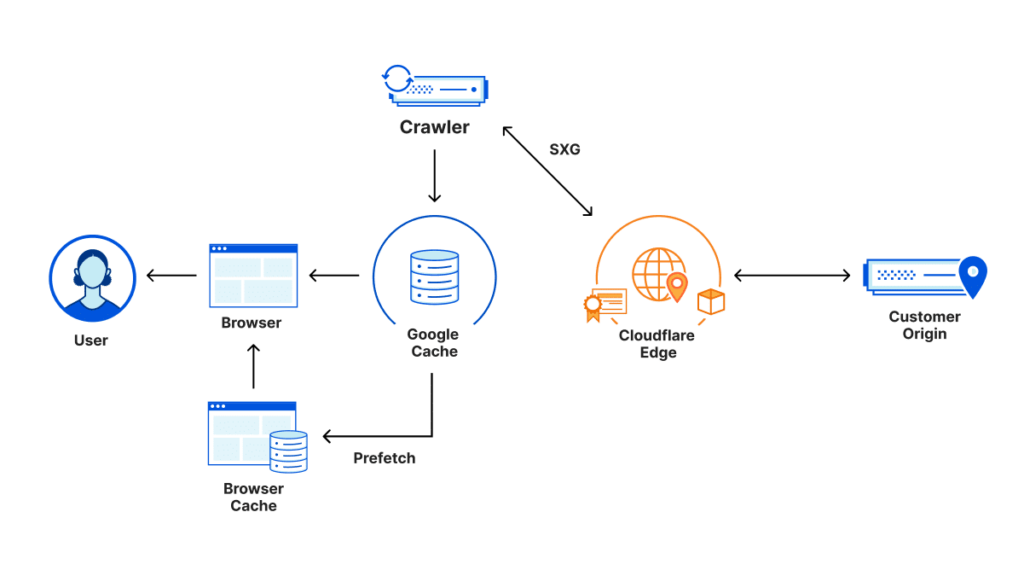
Cloudflare is a connectivity cloud network that sits between your visitors and your origin server. Instead of every request traveling directly to your host, traffic first passes through the global cloudflare network of over 300 data centers. At that edge layer, Cloudflare caches content, filters malicious requests, terminates SSL connections, and routes the rest to your server using optimized pathing.
The company, headquartered in San Francisco and accessible at www.cloudflare.com, is listed on the NYSE and protects a significant percentage of all internet traffic. That scale is not a vanity metric. It is the reason Cloudflare’s security models learn faster than isolated tools. Every attack blocked on one site—from small blogs to critical infrastructure in regions like Ukraine or Hong Kong—improves protection for all of them.
For SEO practitioners, the practical effect is this: Cloudflare gives you CDN, DNS, DDoS protection, a Web Application Firewall, SSL/TLS encryption, edge computing, and AI infrastructure under a single dashboard called Cloudflare One. You stop managing five vendors and start managing one control plane.
How Cloudflare improves SEO
Search engines do not rank “Cloudflare sites” higher simply because they use Cloudflare. What they do is reward the downstream effects that Cloudflare reliably produces. Here is how each layer of the platform maps to a real ranking factor.
Faster page load times through global CDN caching
Cloudflare’s CDN, or content delivery network, caches static assets, HTML pages, JavaScript files, stylesheets, images, and video, at the closest data center to each visitor. A user in Tokyo or Malaysia pulling from a Toronto-hosted site would otherwise wait for a transpacific round trip. Cached at the Tokyo edge, the first byte arrives in milliseconds.
Core Web Vitals, particularly Largest Contentful Paint and Time to First Byte, respond directly to this. Since Google confirmed page experience as a ranking signal, the delta between a site served from a single origin and one served from a geographically distributed group of servers is measurable in both crawl budget and SERP position.
HTTPS, SSL/TLS, and the HTTP-to-HTTPS ranking preference
Google has preferred HTTPS since 2014 and flags insecure sites in Chrome. Cloudflare issues and renews SSL certificates automatically on every plan, including the free tier. Full Strict mode encrypts the connection end to end, from visitor to edge and from edge to origin. For sites that have struggled with certificate renewals or mixed content warnings, this alone can recover lost trust signals.
DDoS protection preserves uptime, and uptime preserves rankings
When a site goes down, Googlebot treats the outage as a signal. Prolonged or repeated unavailability leads to deindexing and ranking loss. Cloudflare’s unmetered DDoS protection absorbs volumetric attacks at the edge so the origin never buckles. This is included on the free plan because Cloudflare’s position is that every site deserves baseline cybersecurity and resilience, not just enterprises.
For sites in competitive or controversial niches, where attacks from competitors or bad actors are a real operational risk, this is one of the clearest direct ties between infrastructure security services and search performance.
Web Application Firewall blocks attacks that would otherwise tank trust
The WAF inspects every incoming request and blocks SQL injection, cross-site scripting, API abuse, and known exploit patterns. A compromised site, one that starts serving malware, hosting spam injections, or redirecting to pharma pages, gets flagged by Google Safe Browsing almost immediately. Recovery from a Safe Browsing flag or a manual action can take weeks. Preventing the compromise in the first place is the cheaper strategy.
Because Cloudflare sees attack patterns across millions of sites, WAF rules update in near real time to defend against zero-day threats. Managed rulesets cover the OWASP Top 10 by default.
Image optimization and code minification reduce payload
Polish and Mirage (Cloudflare’s image optimization features) convert images to modern formats like WebP and resize them based on device. Auto Minify strips whitespace and comments from HTML, CSS, and JavaScript. Brotli compression further reduces transfer sizes. All of this happens at the edge without touching your source files.
Smaller payloads mean faster rendering on mobile, which matters because Google indexes mobile-first. Mobile-friendliness is not a separate checkbox. It is the default ranking context.
Bot management separates Googlebot from bad bot traffic
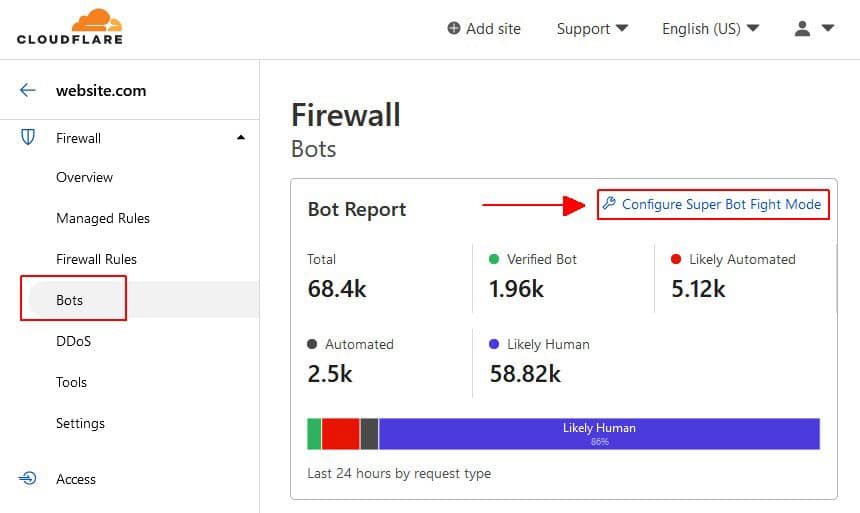
Not all bots are bad, and Cloudflare’s bot protection distinguishes verified crawlers (Googlebot, Bingbot, AI training crawlers you allow) from scrapers, credential stuffers, and fake referral spam. Aggressive bot traffic can waste crawl budget, inflate analytics, and, in extreme cases, trigger rate limits that slow legitimate indexing. Clean bot traffic means cleaner data and more efficient crawling of your actual content.
DNS resolution at Anycast speed
Cloudflare’s DNS service runs on the same Anycast network as everything else. DNS resolution time is a small component of TTFB, but for globally distributed audiences from London to New Zealand it adds up. The service is also resilient against DNS-level DDoS attacks, which historically have taken entire platforms offline.
AI and edge computing: the next layer of SEO infrastructure
The search landscape is shifting. AI Overviews, generative search, and agentic AI systems that cite sources are changing how content gets surfaced. Cloudflare has been building toward this with Workers, Workers AI, and AI Gateway.
Cloudflare Workers for serverless applications at the edge
Workers lets you deploy code, serverless applications, and automated workflows directly onto Cloudflare’s global network. Instead of routing logic back to an origin server, computation happens at the edge closest to the user. For SEO, this unlocks several practical patterns: dynamic personalization without a CDN cache miss, A/B testing at the edge, intelligent redirects, header manipulation for technical SEO fixes, and real-time log enrichment.
Zero cold starts and millisecond response times make Workers suitable for logic that used to live in the origin stack but created latency problems.
Workers AI and AI Gateway for generative and agentic AI workloads
Workers AI runs inference on Cloudflare’s GPU-backed edge network. AI Gateway sits in front of model providers and handles caching, rate limiting, logging, and cost controls for AI agent communications. Together they let you build AI apps and AI agents that run close to users, with observability baked in.
For content teams, the relevance is twofold. First, you can deploy AI-enabled apps, content generators, chatbots, search tools, that feel local even to international audiences. Second, and more strategically, as AI answer engines become more influential in how users find information, having infrastructure that supports AI inference and retrieval at the edge positions you for whatever AI adoption curve your niche ends up on.
Cloudflare has also acquired companies to strengthen this stack, including Human Native (AI licensing marketplace) and partnerships with platforms like Replicate and the Astro web framework. The direction is clear: Cloudflare wants to be the infrastructure layer for AI apps and a better internet, the same way it became the infrastructure layer for traditional web properties.
Application building and scaling on the Cloudflare developer platform
Beyond the caching and security layer, Cloudflare has built out a full developer platform. Workers for compute, R2 for object storage (with no egress fees, which matters for media-heavy sites), D1 for databases, KV for key-value storage, and Durable Objects for stateful applications. This gives you the building blocks for serverless applications, AI inference pipelines, and full web apps without provisioning traditional infrastructure.
For SEO-focused teams, the most immediate wins tend to be:
Edge-side A/B testing that does not poison the CDN cache. Dynamic sitemap generation at the edge. Programmatic SEO pages rendered from an edge database. Real-time internal linking engines. Header rewrites for canonical handling, hreflang, or security headers without touching the CMS.
Connectivity solutions: Cloudflare One and Zero Trust
Cloudflare One is the umbrella that covers secure access, SASE (Secure Access Service Edge), a secure web gateway, WARP, and Zero Trust. In practical terms, this means your internal applications, staging environments, WordPress admin panels, and anything else you do not want the public poking at, can sit behind identity and context evaluation instead of being protected by IP allowlists or VPNs.
Zero Trust applies least privilege access across over 60 cloud services. For agencies managing client infrastructure, this is a way to give developers, writers, and contractors scoped access without provisioning a separate VPN or sharing credentials. It is also the piece of the stack that enterprise buyers increasingly require before a vendor engagement moves forward.

Getting started with Cloudflare
The transition takes about five minutes if your DNS is clean and up to a few hours if it is not. You do not change hosts, rewrite code, or migrate anything.
Step 1: Create an account. Free, Pro ($25/month), Business ($250/month), or Enterprise (custom). Free is enough for most new sites and includes unmetered DDoS protection, global CDN, and universal SSL.
Step 2: Add your domain. Cloudflare scans your existing DNS records and imports them. Review the import carefully, especially MX records for email and any TXT records for verification.
Step 3: Update your nameservers. At your registrar (GoDaddy, Namecheap, Google Domains, wherever your domain is registered), replace the current nameservers with the two Cloudflare provides. Propagation takes anywhere from a few minutes to 48 hours, though most registrars push updates within an hour.
Step 4: Verify SSL and force HTTPS. In the SSL/TLS section of the dashboard, set the mode to Full (Strict) if your origin has a valid certificate, or Full if it does not. Enable Always Use HTTPS.
Step 5: Turn on performance features. Auto Minify, Brotli, and Rocket Loader are reasonable defaults. Test after enabling each. Rocket Loader can break JavaScript-heavy themes, so verify rendering before leaving it on.
Step 6: Configure page rules or the newer Rules engine. Common patterns include cache-everything rules for static paths, bypass-cache rules for admin areas, and redirect rules for legacy URLs.
If you get stuck, Cloudflare offers a test drive workshop, an on-demand webinar, and extensive documentation. For enterprise environments with compliance requirements, speaking with a specialist makes sense before migrating critical infrastructure.

Comparing Cloudflare plans
The free plan is genuinely robust and not a stripped-down demo. It includes the global CDN, universal SSL, unmetered DDoS protection, and basic firewall rules. Most hobby sites, small business sites, and even medium-traffic blogs never need to upgrade.
Pro adds image optimization (Polish), mobile optimization (Mirage), WAF with OWASP ruleset, and accelerated mobile links. It is the right tier for most SEO-focused sites serious about Core Web Vitals.
Business adds advanced WAF rules, custom SSL certificates, a customizable waiting room for traffic spikes, 100% uptime SLA, and bypass cache on cookie, which matters for logged-in experiences. This is the typical agency or ecommerce tier.
Enterprise is where custom ruleset builds, dedicated support, advanced load balancing, and contractual guarantees live. Pricing is negotiated, not listed, and the conversation usually starts with a specialist.
Who uses Cloudflare and why it matters for SEO teams
Cloudflare’s customer base is a reasonable proxy for how seriously you should take the platform. The company serves a meaningful share of the Fortune 500, powers infrastructure for major publishers, ecommerce platforms, SaaS companies, and has been named a Leader in industry reports from Gartner, Forrester, and IDC across categories like WAF, DDoS mitigation, Zero Trust, and edge development platforms.
For SEO teams, this recognition matters for two practical reasons.
First, customer stories from enterprises with demanding uptime and performance requirements, companies like Shopify, Canva, DoorDash, and IBM have all publicly discussed Cloudflare usage, validate that the infrastructure can handle the kind of traffic and complexity your sites might eventually grow into. You are not betting on a platform that will fold under scale.
Second, expert insights from analysts and from Cloudflare’s own research team (published regularly on the Cloudflare blog and in the Radar threat intelligence dashboard) give you industry-grade data you can cite in your own content. For agencies building E-E-A-T signals in technical niches, referencing first-party Cloudflare research on bot traffic, DDoS trends, or AI crawler activity is a defensible way to back up claims.
The short version: when a platform is simultaneously trusted by critical infrastructure operators and available on a free plan to a solo blogger, the risk profile for adopting it is unusually low.
Cloudflare FAQs
Why is Cloudflare blocking me?
Can I use Cloudflare for free?
How do I switch DNS to Cloudflare without downtime?
Does Cloudflare replace my web host?
Will Cloudflare affect my Google Analytics data?
Does Cloudflare help with programmatic SEO?
The bottom line
Cloudflare is not an SEO tool. It is infrastructure that makes SEO easier because the things search engines reward (speed, security, availability, mobile performance) are the things Cloudflare is engineered to deliver. The free plan alone handles most of what a new site needs. Pro and Business tiers add polish for Core Web Vitals and advanced firewalling. Workers and the AI platform are where the forward-looking edge lives, and for teams building toward agentic AI search and AI-native discovery, that is the layer worth learning now.
Whether you are running a ten-visitor-a-day blog or a network of client sites in a competitive niche, the combination of CDN, DDoS protection, WAF, SSL, and edge compute under one roof is hard to assemble any other way. And at the free tier, the cost of trying it is zero.
Related:
Published on: 2023-03-31
Updated on: 2026-08-01
