The SERP Title Tag and Meta Optimization Tool is the easiest way to see how your metadata will appear in Google search results. Try it now and optimize your site for better click-through rates!


 Rating: 9,4/10 – 112 votes
 (23)
(23)How This SERP Snippet Preview Tool Works
This SERP simulator gives you a real-time preview of how your page title, URL, and meta description will appear in Google’s organic search results. As you type, the tool calculates pixel width for both your title tag and meta description so you can see exactly where Google will cut your text with an ellipsis.
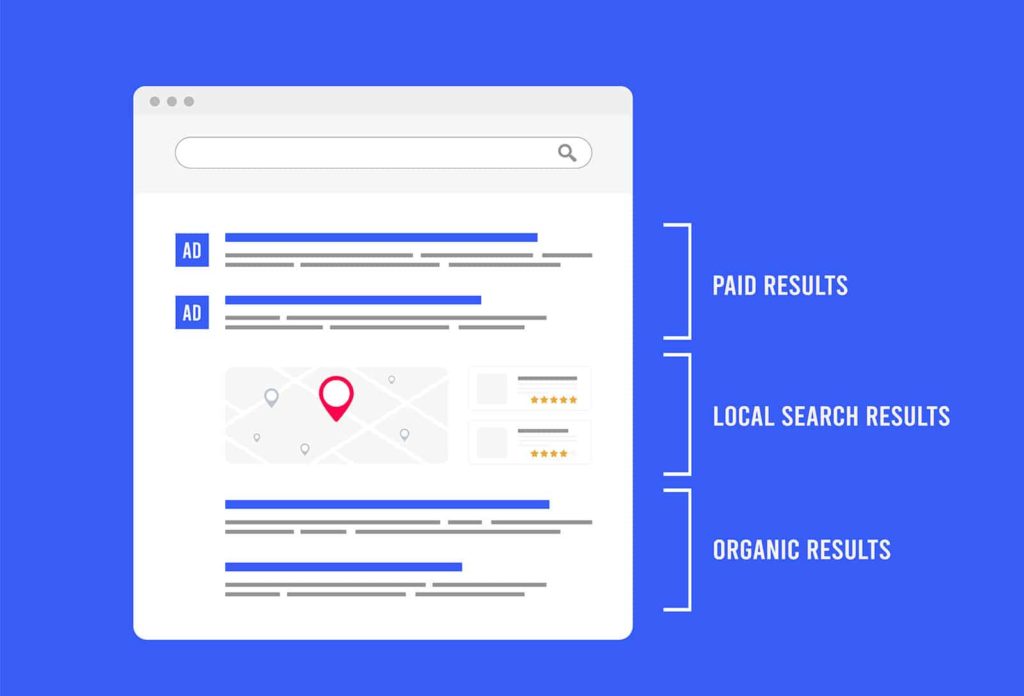
Use the desktop preview to check how your organic snippet looks on standard screens, or toggle to mobile preview to see how it renders on smaller devices. The tool also supports a published-on date display and rich snippet formatting, including rating stars, so you can simulate how structured data markup affects your listing’s appearance in search engine results pages.
Your snippet sits alongside other SERP features like ads and map packs, People Also Ask boxes, AI-generated overviews, People Also Search For suggestions, and featured snippets. Optimizing your meta title and meta description helps your listing compete for attention and clicks in that crowded space.
Why Title Tags and Meta Descriptions Matter for Click-Through Rates
Your title tag and meta description are the first impression searchers get. Even if you rank well, a poorly written snippet means lost clicks to competitors below you.
Click-through rate is considered a signal in Google’s ranking algorithm. Improving your CTR can indirectly improve your ranking over time, creating a compounding effect on organic search engine traffic.
Action-oriented language in your title tag and meta description can make the difference between a scroll-past and a click. Matching search intent matters too. A page targeting transactional or commercial intent should use different language than one targeting informational queries. For ecommerce SEO, including price points, availability, or offers in your meta description can increase engagement. For local SEO, adding your city or service area helps searchers self-qualify before they click.
Title Tag Best Practices
The title tag is an HTML element that tells both search engines and visitors what a page is about. It appears as the clickable headline in organic search results and displays in the browser tab.
Pixel width, not character count. Google truncates title tags based on pixel width, not a fixed character limit. Narrow letters like “i” and “l” take up less space than “W” or “M.” This tool measures your title in pixels (up to 580px) so you can see exactly where truncation happens instead of guessing based on character count alone.
To write a strong page title:
- Put your main keyword near the front of the title tag. Google gives more weight to terms that appear early.
- Keep each title tag unique and descriptive across your site. Duplicate titles confuse search engines and make your listings blend together in SERPs.
- Write clickable headlines that accurately reflect the page’s content. Misleading titles increase bounce rate, which signals to Google that the result was not helpful.
- Use your H1 tag to reinforce the title tag’s topic, but avoid making them identical. A slight variation helps you cover more keyword ground.
Meta Description Best Practices
The meta description is an HTML element that provides a short summary of the page’s content. It appears below the title tag in search engine results pages. While meta descriptions do not directly affect rankings, they are a primary driver of click-through rate.
Pixel width matters here too. Google allocates roughly 990 pixels for meta descriptions on desktop. This tool shows your current pixel length so you can avoid truncation.
To write better meta descriptions:
- Include your target keyword or focus keyword naturally. Google bolds matching terms in the snippet, which draws the eye and increases CTR.
- Write unique meta descriptions for every page. Non-descriptive meta descriptions or duplicates across pages signal low quality to Google.
- Match the description to the search intent behind your target keyword. If someone is searching with commercial intent, tell them what they will get by clicking through.
- Use a meta description length checker (like this tool) before publishing. Even a few extra pixels can cause truncation that cuts off your call to action.
How to Control Your Search Snippets
Google does not always use the meta description you write. It sometimes pulls text from the page body that it considers a better match for the query. There are a few ways to influence what appears.
Structured data markup like JSON-LD schema lets you provide explicit information to Google. Rich snippets powered by structured data can display rating stars, pricing, breadcrumbs, FAQ dropdowns, and other enhanced elements in organic search results. A FAQ schema generator can help you create the markup quickly.
Meta robots tags give you more control over snippet behavior. The nosnippet robots meta tag tells Google not to show any text snippet at all. The data-nosnippet HTML attribute lets you exclude specific sections of a page from being pulled into snippets while allowing the rest. You can also use the max-snippet directive to set character limits on how much text Google can display.
Microformats and other structured data formats provide additional context. Breadcrumbs in your structured data help Google display a cleaner URL path in your listing instead of the raw URL slug.
Common Mistakes to Avoid
A few recurring errors undermine snippet performance:
Keyword stuffing your title tag. Cramming multiple keywords into your title makes it unreadable and can trigger Google to rewrite it entirely. One primary keyword, placed naturally, outperforms a stuffed title every time.
Ignoring pixel width and relying on character count. A title that is “under 60 characters” can still get truncated if it uses wide characters. Always check the pixel width of your title tag and meta description tags using a snippet preview tool.
Using the same meta description across multiple pages. Non-descriptive meta descriptions or duplicated ones across your site provide no incremental value. Google may ignore them entirely and pull its own snippet from the page body.
Overlooking the URL slug. A clean, descriptive URL slug reinforces relevance. A URL like /addiction-treatment-programs tells searchers more than /page?id=4827 and looks more trustworthy in organic search results.
Displaying a published-on date when it hurts you. If your content is not time-sensitive, showing an old date in your snippet can make searchers skip your listing for something that looks more current. Be intentional about whether you display the date.
Export and Implement Your Optimized Snippet
Once your SERP snippet preview looks right in this tool, copy the optimized title tag and meta description into your site.
If you use WordPress, paste the title and description into your SEO plugin’s fields (Yoast, Rank Math, or similar). In a custom HTML file, update the <title> element and the <meta name="description"> tag directly. Most CMS platforms have dedicated fields for this metadata.
After publishing, verify the changes by searching for your page in Google and checking the live snippet. It can take a few days for Google to recrawl and update the listing. If Google is not using your meta description, check that the page content closely matches the description you wrote and that no conflicting robots meta tag directives are in place.
For ecommerce SEO, consider running A/B tests on your snippets. Write two versions of a meta description with different angles (one benefit-focused, one offer-focused) and measure which one drives a higher click-through rate over a set period.
Test different variations of your title tag and description using this SERP snippet preview tool before going live. Small adjustments to wording, keyword placement, and length can meaningfully shift CTR on high-traffic pages.
Published on: 2022-11-06
Updated on: 2026-04-02
